
User Guide: How Sabay Accounting Empowers Your Business
Welcome to Sabay Accounting! Our platform is specifically designed to help business owners and teams manage their finances easily, accurately, and with confidence.
Part 1: How Sabay Accounting Helps Your Business (Overview)
Sabay Accounting serves as a smart financial management solution that empowers your business in key operational areas:
Real-Time Financial & Profit Tracking: Get instant visibility into your current financial status and actual net profit on a daily or monthly basis—without waiting for end-of-month reconciliations.
Cash Flow Management: Monitor real-time balances for both your physical cash on hand and money across all your bank accounts.
Receivables & Payables Management (AR & AP): Easily track outstanding customer invoices (who owes you money) and vendor bills (what you owe to suppliers).
Tax & VAT Compliance: Automatically calculate and organize Value Added Tax (VAT Input & Output) data according to local tax standards.
Accurate Financial Reporting: Make informed business decisions using clear visual charts, automated reporting, and structured data.
Part 2: Detailed Dashboard Overview & Features
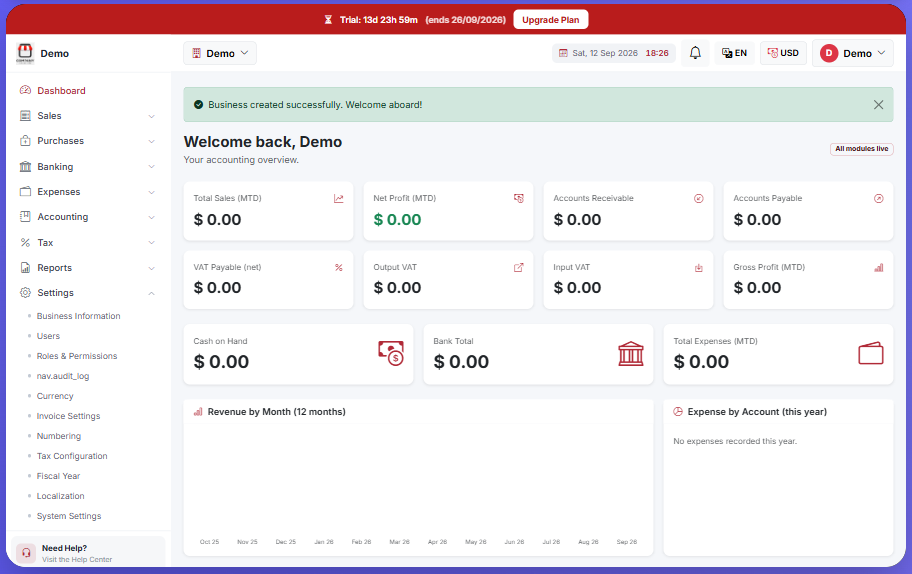
When you log in to the platform, you are welcomed by the primary Dashboard—your control center for real-time insights:
1. Key Financial Indicators (Top Metrics)
Total Sales (MTD): Shows total sales revenue accumulated from the beginning of the current month to date.
Net Profit (MTD): Displays net profit after deducting cost of goods sold and operating expenses.
Accounts Receivable: Displays the total amount owed to your business by customers.
Accounts Payable: Displays the total outstanding balance your business owes to suppliers.
2. Tax & VAT Overview
VAT Payable (net): Displays the net VAT amount due for tax reporting.
Output VAT: Tracks the VAT collected from your sales of goods or services.
Input VAT: Tracks the VAT paid on your business purchases and operational expenses.
Gross Profit (MTD): Shows the month-to-date gross profit before deducting operating overheads.
3. Cash & Expense Tracking
Cash on Hand: Shows total physical cash available in your petty cash/registers.
Bank Total: Shows the combined balance across all registered bank accounts.
Total Expenses (MTD): Summarizes total operational expenses incurred during the current month.
Revenue & Expense Charts: Visual charts including Revenue by Month (12 months) and Expense by Account (this year) to analyze trends visually.
4. Side Navigation Menu (Core Modules)
From the left menu panel, you can access detailed operational features:
Sales: Create invoices, quotes, sales receipts, and manage customer records.
Purchases: Manage purchase orders, supplier bills, and vendor profiles.
Banking: Connect bank accounts and perform account reconciliations.
Expenses: Record day-to-day business and operational expenses.
Accounting: Access your Chart of Accounts, perform manual journal entries, and review ledger accounts.
Tax: Manage tax configurations and generate tax-ready summaries.
Reports: Generate key financial statements, including Profit & Loss (P&L), Balance Sheets, and Cash Flow reports.
Settings: Update business details, invite users, set Roles & Permissions, configure currencies, invoice layouts, and audit logs.
Was this article helpful?
On this page
Our support team is here to help.
Contact Support