
User Guide: Managing Profile Information & Password (English)
Sabay Accounting allows you to easily update your personal profile details and security settings to keep your account secure.
Sabay Accounting allows you to easily update your personal profile details and security settings to keep your account secure.
Step 1: Accessing My Profile
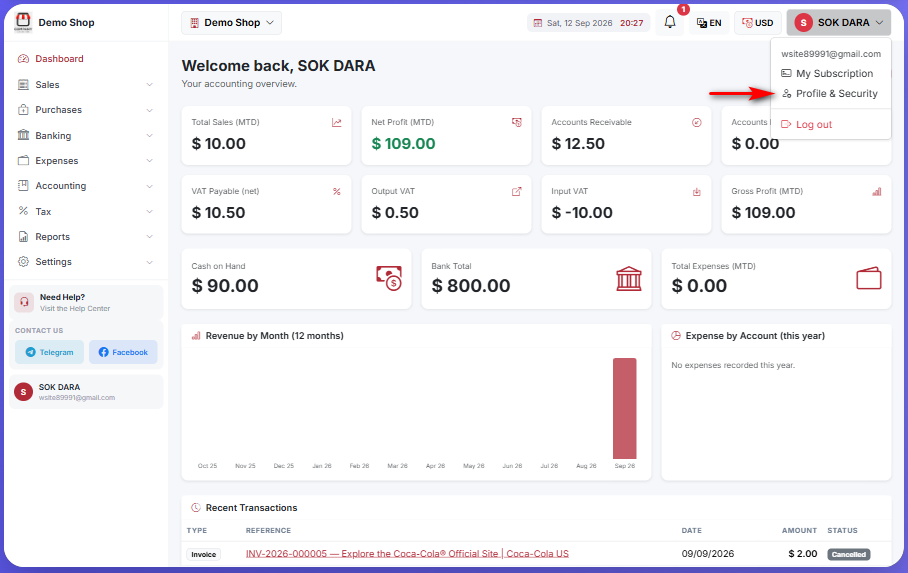
On the top-right header of your screen, click on your profile name (e.g., SOK DARA).
Click on "រូបប្រវត្តិ និងសុវត្ថិភាព" (My Profile) from the drop-down menu.
Step 2: Updating Profile Information Under the Profile Information section on the left:
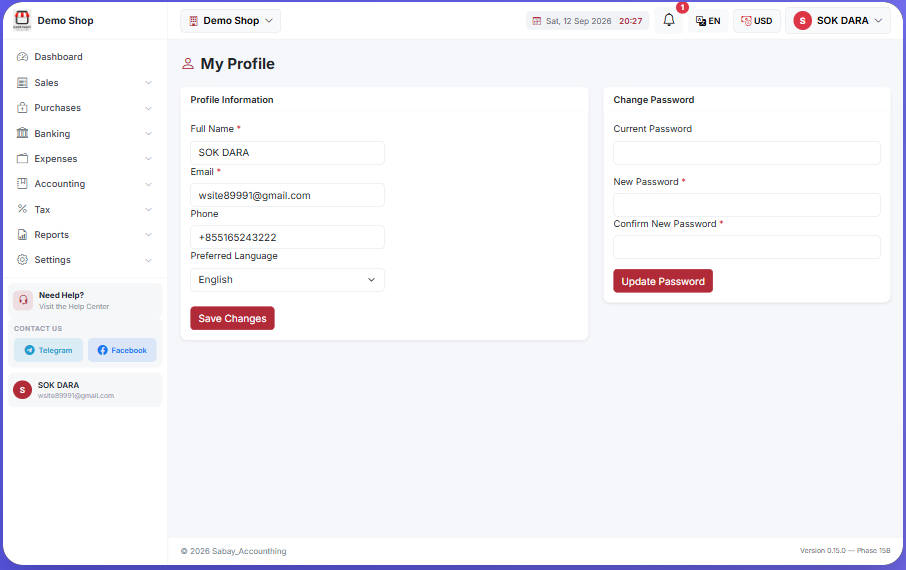
*Full Name : Update your full display name.
*Email : View your registered account email.
Phone: Enter or update your contact phone number.
Preferred Language: Select your system language preference (e.g., Khmer or English).
Click "រក្សាទុកការផ្លាស់ប្តូរ" (Save Changes) to apply your updates.
Step 3: Changing Your Password Under the Update Password section on the right:
Current Password: Type in your existing password.
*New Password : Enter your new password.
*Confirm New Password : Re-enter the new password for verification.
Click "ធ្វើបច្ចុប្បន្នភាពពាក្យសម្ងាត់" (Update Password) to complete the change.
Was this article helpful?
Our support team is here to help.
Contact Support